
From real space to real impact
We capture your environment, turn it into a structured digital system, and help your team use it in real workflows.

1. Capture the real space
We scan your environment using Matterport 3D cameras, 360° capture, and drone mapping when needed
→ Creates an accurate digital foundation of your facility

2. Build the digital environment
We turn your space into a clear, navigable system with structured data and navigation.
→ Turns your space into a usable digital system

3. Use it in real workflows
Teams use the environment for onboarding, training, inspections, and coordination
→ Fewer site visits, faster decisions, better alignment
What this looks like in practice
Below is a real example of how the system works — combining navigation, information, and operational use in one environment.
Explore full capabilities
The system is built in layers.
Below you can explore how each part works — and how it comes together in real use.
1. Navigation and Orientation

3D Environment
Move through spaces as if you were on-site and understand layouts instantly

4K Visual Quality
See details clearly at any scale for confident navigation and inspection

Dollhouse & Spatial View
Understand the full layout and how zones connect across the space

Drone 360° Panoramas
See how buildings and surrounding areas connect in real context
2. Information in context

Multimedia Menu (Hub)
Quickly access key zones, areas, and structured content

Tags & Structured Categories
Explore information directly inside the space — no separate systems
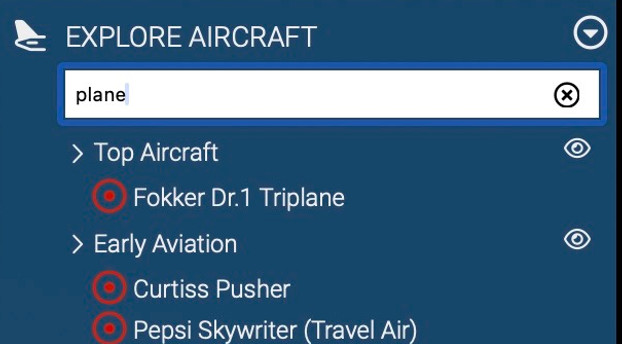
Search & Filtering
Find what you need across large environments instantly

Embedded Media
Videos, images, and instructions appear in context.
3. Search & Structure

Web Wayfinder
Automatically generate a path from the current position to any selected destination.

Indoor Navigation Paths
Visual guidance shows how spaces connect and how to move between them.

AR Player (Optional)
Access navigation and guidance on mobile devices in real space

Contextual Interaction
Display information tied to real-world locations.
4. Access control

User-Level Access
Define what each user sees based on role

Internal vs External Access
Separate team, client, and partner visibility
Secure Environment Use
Ensure controlled and structured information access

Contextual Interaction
Display relevant information tied to specific locations
5. Workflows & interaction

AI Knowledge Assistant (Optional)
Provide quick answers and guidance based on the current view

Guided Exploration
Create structured paths for onboarding, training, and walkthroughs

Gamification Tools (Optional)
Use checkpoints and progress tracking to guide engagement
Embedded Video Guidance
Deliver explanations and introductions directly inside the environment.
6. For technical and enterprise use

Point Cloud Data
Accurate geometry for analysis and measurement

E57 & Open Formats
Compatible with CAD, BIM, and industry-standard tools

3D Mesh Models
Structured geometry for planning and visualization

IoT Integration
Connect real-time data and external systems
Pricing & Delivery
Solutions are tailored to the size, complexity, and intended use of the environment.
Scope & Use
Each project is defined by how your space will be used from a single area to a full facility or multi-site environment.
Scope depends on:
-
number of areas or zones
-
navigation and structure
-
level of embedded content (tags, media, multilingual)
-
operational use (training, inspections, coordination)
-
required integrations (AI, AR, systems)
Designed for:
navigation, onboarding, inspections, coordination, and remote understanding
Pricing & Delivery
Projects are defined individually, but most fall within a clear range.
Typical starting point:
-
Focused environments: from $999+
-
Multi-zone environments: from $2,500+
-
Infrastructure-scale projects: defined per scope
Delivery:
-
First working version: 5–10 business days
-
Designed for real use — not a prototype
Approach:
-
Start with one area
-
Test in real workflows
-
Expand only if it delivers value
What You Get
-
A working digital environment of your space (not a demo)
-
Access via browser — no software installation required
-
Structured navigation across rooms, zones, and key areas
-
Embedded content (documents, media, system information)
-
Role-based access for teams, clients, and partners
Included:
-
Hosted environment with continuous access
-
Typically provided with an annual subscription
-
Can be expanded across multiple zones or locations
-
Support for updates and scaling