
A Digital Visitor Environment for Modern Museums
Help visitors explore, learn, and connect with your museum before they arrive.
✔ Easy Navigation
Museum Guide
Information in Context
Visitor Assistant
Interactive guidance and Q&A
Mobile Access
Accessible from any browser and mobile device
100,000+ sq ft
Museum Guide
Information in Context
Events and Venue Visibility
One Connected Experience
Better Orientation
Visitors arrive knowing where to go.
Stronger Engagement
Interactive experiences for visitors of all ages.
Support Education
Perfect for schools, STEM programs, and guided tours.
Increase Impact
Showcase your collection before visitors even arrive.
Mobile Access
Accessible from any browser and mobile device
Guided navigation across the museum
Interactive information points (text, video)
Multi-language
access
Visitor assistant (Q&A inside the space)
Mobile access
via QR

International award winner.
Best Digital Twim

Used in real environments — not a demo
Live Interactive Tour. Not video. Fully explorable.
Built with navigation, content layers, multilingual access, and more.
Guided navigation across the museum
Interactive information points (text, video)
Multi-language
access
Visitor assistant
(Q&A inside the space)
Mobile access
via QR
Award-Winning Digital Visitor Environment
Winner – Digital Twin Awards 2026
Used by Hiller Aviation Museum
San Carlos, California
WHY MUSEUMS USE IT
Real challenges. Real value.
Visitors arrive prepared
Visitors already know where to start, what to see, and how the museum is organized.
Better family experience
Parents can plan the visit before arrival and discover activities designed for children
International visitors
Provide multilingual guidance and improve accessibility for visitors from around the world.
Additional revenue opportunities
Offer premium digital tours, exclusive content, memberships, and special visitor experiences.
One connected system
Maps, exhibits, videos, educational content, and visitor information—all in one place.
Better Orientation
Visitors arrive knowing where to go.
Stronger Engagement
Interactive experiences for visitors of all ages.
Support Education
Perfect for schools, STEM programs, and guided tours.
Increase Impact
Showcase your collection before visitors even arrive.
Mobile Access
Accessible from any browser and mobile device
100,000+ sq ft
Museum Guide
Information in Context
Events and Venue Visibility
One Connected Experience
Before
-
Website
-
Printed Map
-
Brochure
-
PDF Guides
-
Videos
-
Separate Resources
After
-
One Interactive Visitor Environment
-
✔ Easy Navigation
-
✔ Museum Guide
-
✔ Information in Context
-
✔ Visitor Engagement
-
✔ Educational Content
-
✔ Multilingual Support
-
✔ Premium Experiences
-
✔ Always Up to Date
Guided navigation across the museum
Interactive information points (text, video)
Multi-language
access
Visitor assistant (Q&A inside the space)
Mobile access
via QR
WHAT VISITORS CAN DO
Designed for real visitors. On any device.
A shared digital environment helps visitors explore the space, understand exhibits, and navigate the museum before their visit.
✔ Easy Navigation
Museum Guide
Information in Context
Visitor Assistant
Interactive guidance and Q&A
Mobile Access
Accessible from any browser and mobile device
From real space to real impact
We capture your environment, turn it into a structured digital system, and help your team use it in real workflows.

1. Capture the real space
We scan your environment using Matterport 3D cameras, 360° capture, and drone mapping when needed
→ Creates an accurate digital foundation of your facility

2. Build the digital environment
We turn your space into a clear, navigable system with structured data and navigation.
→ Turns your space into a usable digital system

3. Use it in real workflows
Teams use the environment for onboarding, training, inspections, and coordination
→ Fewer site visits, faster decisions, better alignment
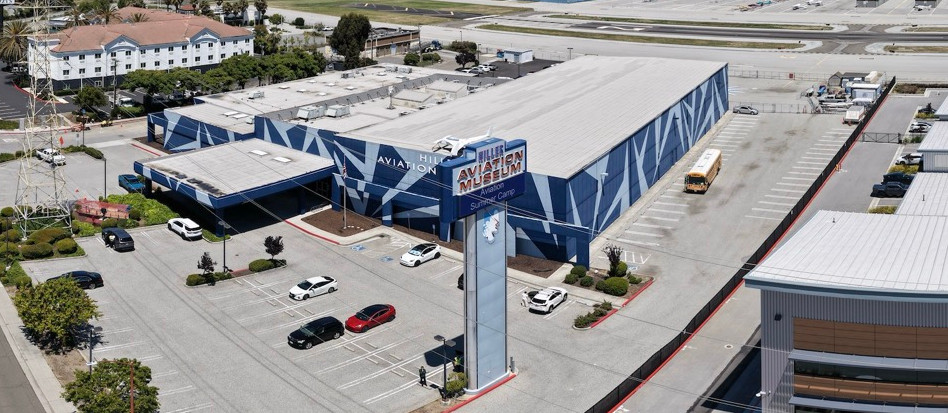
Hiller Aviation Museum. Navigation and engagement at scale
Hiller Aviation Museum is a large public venue showcasing aviation history and hosting events.
Visitors and teams needed a way to understand and navigate the full space — without being physically on-site.
A structured digital environment was created to provide full visibility of the museum — with navigation, embedded content, and guided exploration.
Result
-
Improved visitor navigation and understanding
-
Increased engagement across exhibits
-
Better visibility for events and space usage
What was delivered
-
Full interactive environment (~100,000 sq ft)
-
Structured navigation across galleries and zones
-
Embedded content, media, and educational layers
-
Multi-purpose use for visitors, staff, and events
Why it works
-
Visitors can explore large, complex spaces easily
-
Navigation reflects the real layout
-
Content is integrated directly into the environment
-
Supports both remote and on-site use

“Our visitors can now explore the collection from anywhere — and it has helped us showcase our event space far more effectively.” — Jon Welte, President & CEO

About the Digital Twin Awards.
An international recognition for projects demonstrating real-world value of digital environments.
View the official listing
Request a pilot
Tell us about your environment — we’ll suggest a practical way to start.
Start with a single exhibition.
One building.
One visitor route.
No cost.
No obligation
Pilot terms are defined in the service agreement
✓ Explore Exhibits & Aircraft
✓ Plan a Family Visit
✓ Follow Guided Routes
✓ Museum Guide
✓ AI Assistant (optional)
✓ Audio Tours
✓ Children’s Missions
✓ Watch Videos & Stories
✓ Search Collections
✓ Find Services & Amenities
✓ Buy Tickets
✓ Donate
✓ Access Member Content
✓ Premium Guided Experiences
✓ Multiple Languages
Start with one operational area
1
Select
Select one venue zone, exhibit hall, or operational area.
2
Build
Build a pilot using existing content and documentation.
3
Evaluate
Evaluate the environment in real-world use with your team.
4
Expand
Expand only if the pilot proves valuable.

Powerful Features Included
Experience your facility exactly as it is — room by room, zone by zone — with full 360° navigation.
Unlike video, users control the pace and direction, exploring exactly what matters to them.
Ideal for showcasing operational flows, emergency routes, or space utilization — remotely.
Consolidate all essential content — videos, manuals, maps, floor plans, and documents — in a single structured menu. No need to send multiple files or links — everything is built into the 3D environment.
Perfect for internal training, investor briefings, or onboarding.
Your tour can be instantly translated into multiple languages, including Bahasa Indonesia, English, and others. The interface adjusts automatically based on the user’s device or browser settings.
This makes your digital twin ready for international stakeholders, staff, or public access.
Align the entire tour with your visual identity — from logos and typography to background music and colors. Clients and stakeholders immediately recognize your brand and professionalism.
Supports multilingual branding and co-branded environments.
Embed clickable points inside your space that highlight key infrastructure, assets, or zones.
Each hotspot can open images, video explainers, safety instructions, or technical documents.
Use them to educate staff, demonstrate features, or support compliance walkthroughs.
Add wayfinding arrows, smart routing, and clickable zone labels to simplify navigation in complex facilities. Users can jump to specific areas, navigate multi-floor buildings, or explore operational layouts with ease. Ideal for airports, factories, large venues, or government campuses.
Connect your digital twin to live systems — from temperature sensors to CCTV, machinery status, or fire alarms. Display real-time or historical data directly in the 3D space for technical oversight or maintenance reviews. Supports dashboards, alert triggers, and SCADA/BMS overlays.
See exactly how your digital twin is being used: who visits, where they go, how long they stay, and what they interact with. Use heatmaps and behavior flows to refine layouts, content, or user experience.
Includes integration with Google Analytics and optional custom analytics panels.
What is a digital layer, and how is it different from a virtual tour?
At first glance, it may look like a virtual tour.
In practice, it is a structured digital environment built on top of a real space. It connects navigation, content, and user flows into a system that helps people understand, navigate, and use complex environments before they arrive.
Unlike a simple virtual tour, it can support training, planning, inspections, visitor experience, and team coordination.
What does a typical project include?
Each project is defined by the environment and how it will be used.
A basic implementation may include a clear 3D environment with structured navigation. More advanced environments can include embedded content, multilingual access, guided paths, analytics, and optional features such as AR, AI assistance, or integration with existing systems.
The goal is not just to visualize a space, but to create a usable environment.
How does a project usually start?
Most projects start with a focused area or selected environment. This allows the team to test the experience in real use before expanding it further.
What planners typically need before booking
✓ Can this venue accommodate our event?
✓ Where do guests park?
✓ Where is registration?
✓ What utilities are available?
✓ What amenities are included?
✓ Where do vendors unload?
Event Venue Applications
Vendor Coordination
-
Loading.
-
Utilities.
-
Schedules.
Guest Experience
-
Parking.
-
Entrances.
-
Amenities.
Venue Operations
-
Daily coordination.
-
Documents.
-
Internal information.
See how your space becomes interactive

4K walk-through
Explore the entire space in high detail, even on close zoom.

Interactive content
Add text, video, links, and documents directly inside the tour.

QR & mobile access
Open instantly on any device from website, email, or print.

Branding
Customize with your logo, colors, and visual style.
Navigation & languages
Clear menu, structured sections, and support for multiple languages.
Analytics
Understand what visitors explore and what drives engagement.
1. Navigation and Orientation

3D Environment
Move through spaces as if you were on-site and understand layouts instantly

4K Visual Quality
See details clearly at any scale for confident navigation and inspection

Dollhouse & Spatial View
Understand the full layout and how zones connect across the space

Drone 360° Panoramas
See how buildings and surrounding areas connect in real context
2. Information in context

Multimedia Menu (Hub)
Quickly access key zones, areas, and structured content

Tags & Structured Categories
Explore information directly inside the space — no separate systems
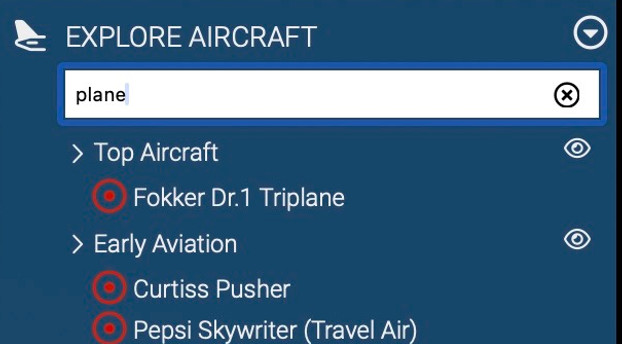
Search & Filtering
Find what you need across large environments instantly

Embedded Media
Videos, images, and instructions appear in context.
3. Search & Structure

Web Wayfinder
Automatically generate a path from the current position to any selected destination.

Indoor Navigation Paths
Visual guidance shows how spaces connect and how to move between them.

AR Player (Optional)
Access navigation and guidance on mobile devices in real space

Contextual Interaction
Display information tied to real-world locations.
4. Access control

User-Level Access
Define what each user sees based on role

Internal vs External Access
Separate team, client, and partner visibility
Secure Environment Use
Ensure controlled and structured information access

Contextual Interaction
Display relevant information tied to specific locations
5. Workflows & interaction

AI Knowledge Assistant (Optional)
Provide quick answers and guidance based on the current view

Guided Exploration
Create structured paths for onboarding, training, and walkthroughs

Gamification Tools (Optional)
Use checkpoints and progress tracking to guide engagement
Embedded Video Guidance
Deliver explanations and introductions directly inside the environment.
Real results from real use
+25%
increase in online engagement
Up to 75%
fewer project issues
30%
improvement in training efficiency
No cost / No commitment / No public exposure
PILOT PROGRAM
Start with one operational area
No full rollout required
No cost / No commitment / No public exposure
Example pilot:
Example pilot: one gallery, one visitor path, or one exhibition area.
Secure browser-based pilot environment with navigation, tagging, and operational information integration.
Password-protected internal access. Accessible from any browser and mobile device
Interactive digital visitor environments for museums, campuses, public facilities, and complex spaces.
What is a digital layer, and how is it different from a virtual tour?
At first glance, it may look like a virtual tour.
In practice, it is a structured digital environment built on top of a real space. It connects navigation, content, and user flows into a system that helps people understand, navigate, and use complex environments before they arrive.
Unlike a simple virtual tour, it can support training, planning, inspections, visitor experience, and team coordination.
What does a typical project include?
Each project is defined by the environment and how it will be used.
A basic implementation may include a clear 3D environment with structured navigation. More advanced environments can include embedded content, multilingual access, guided paths, analytics, and optional features such as AR, AI assistance, or integration with existing systems.
The goal is not just to visualize a space, but to create a usable environment.
How does a project usually start?
Most projects start with a focused area or selected environment. This allows the team to test the experience in real use before expanding it further.
See how it works
Built for Aviation Operations
A digital twin becomes a 24/7 interactive showcase for aircraft, hangars, and aviation services. It helps prospects understand your facility before their first visit.

For Flight Schools
Help prospective students understand your training environment before they arrive.
-
introduce students to the facility and aircraft
-
explain where to go on the first day
-
showcase classrooms, briefing rooms, and training spaces

For Charter & Rental Operators
Present aircraft and facilities in a premium digital format before the client arrives.
-
showcase aircraft interiors and key features
-
build trust before the first visit
-
support charter inquiries and online lead generation
For Hangars & MRO Facilities
Provide a clear and professional overview of maintenance and service environments.
-
present hangars and technical spaces clearly
-
help customers and partners understand the layout
-
explain services through interactive information points


Slava Kiselev · Founder
+1 669 667 9080 · info@dronevr360.com
Case Study: Hiller Aviation Museum
Current Challenges
New Experience
Visitors explore the museum before they arrive
Exhibits are explained inside the space
Visitors understand how to navigate and plan
100,000+ sq ft • public aviation facility • daily operational use
“His work has a direct practical benefit for aviation education, workforce training, and safety.” — Jon Welte, President & CEO

Supports visitor orientation, education,
and event presentation
International award winner.
Best Digital Twim
Guided Navigation
Visitor navigation across the museum
Interactive Information
Exhibits, media, and educational content
Multi-Language Access
Support international visitors
Visitor Assistant
Interactive guidance and Q&A
Mobile Access
Accessible from any browser and mobile device
Used in real environments — not a demo
Live Interactive Tour. Not video. Fully explorable.
Built with navigation, content layers, multilingual access, and more.
Guided navigation across the museum
Interactive information points (text, video)
Multi-language
access
Visitor assistant
(Q&A inside the space)
Mobile access
via QR

Real results from real use
50–75%
fewer site visits
30–50%
faster onboarding
Up to 70%
reduction in site survey costs


